This article contains affiliate links. We may earn a commission if you buy through them. Thanks for supporting Desktop Documentaries. Learn more.
If you’ve ever spent ages hunting for a shot you know you filmed, you’ll understand the appeal of being able to search your footage by description. That’s one of the things Jumper can do, alongside finding people, spoken phrases and shots that resemble a reference image.
Jumper’s co-founders, Max Lund and Anton Tyrberg, joined documentary filmmaker Philip Shane to show us how it works. We looked at a few tasks that will be familiar to documentary editors: finding a particular person, tracking down a remembered shot and looking through interview material for a useful soundbite.
Here’s what they showed us, along with a few things to know before trying it on your own footage.
Before you start searching
Jumper analyzes and searches your footage on your own computer. Once the software is activated and the models downloaded, you can do that work offline.
That means sensitive interviews and footage you're keeping under wraps can stay on your own drives.
Before you can search, Jumper needs to analyze the files. How long that takes depends on the amount of footage, its resolution, the AI model you choose and the power of your computer. More detailed models generally take longer, so allow for that preparation time when planning an edit.
You can use Jumper inside Avid, Premiere Pro, DaVinci Resolve and Final Cut Pro, or in a standalone app. People search and AI-assistant integration are Pro features.
You can also ask it to create summaries of your videos. An overview leads into more detailed sections, linked to the relevant parts of the recording. That could help you get your bearings in a long interview or unfamiliar archive before searching for individual moments. The summary is a guide to the footage; you still need to watch the passages you plan to use.
Finding that shot: searching by description or image
One of the first things Max showed us was how to run a simple search. He typed in “a red F1 car,” then changed red to green to see how the results changed.
He also showed us how to find a spoken phrase and use an image to look for similar shots. Here’s how that looked:
Session excerpt: finding shots
The demo uses racing cars. For a documentary, you might be looking for someone making coffee, a street at night or a crowd arriving at an event.
You might remember what a scene looks like without knowing the filename or how you logged it. A description or reference image gives you something else to search with.
The search can extend beyond your current project, too. Jumper can search previously analyzed material across projects and drives, even when a source drive is disconnected. You reconnect it when you want the original footage. So a shot from an older project can still appear in the results.
Finding the people in your documentary footage
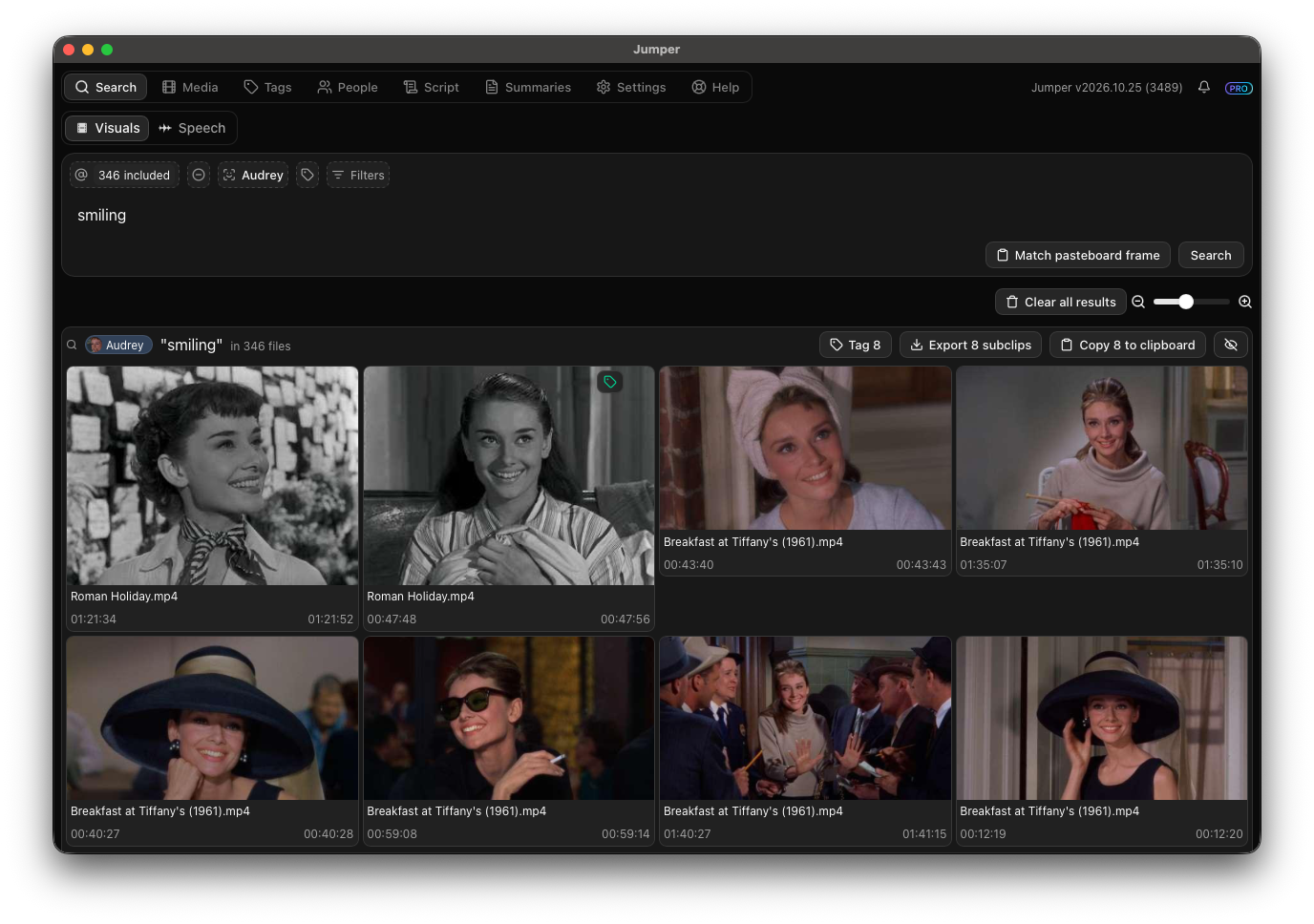
Next, Max looked for a person sitting on a couch, then drinking. He added a second person to find shots of them together.
Session excerpt: finding people
If you've followed someone for months, shots of them may be scattered across interviews, scenes and B-roll. Searching by name and action gives you another way to find them.
Jumper groups detected faces so you can give people names, then use those names in searches. You could look for one contributor's reactions, or scenes where two people appear together.
Finding a soundbite with an AI assistant
Philip wanted to know whether Jumper could help gather interview material about subjects like childhood, work or retirement. That brought us to its connection with LLMs such as ChatGPT or Claude.
Max tried this with a podcast transcript, asking an assistant to find a good soundbite. It came back with a suggested passage and the timings to find it in the original recording:
Session excerpt: finding a soundbite
For documentary interviews, the same approach could help you locate passages to review in the original recording. The assistant works with the transcripts; you decide which material to use in the edit.
One thing to watch out for: if you connect Jumper to an LLM such as ChatGPT or Claude, transcript excerpts, preview images and file details may be sent to that service. Jumper's own analysis runs on your computer, and you don't need that connection for its local searches.
Where it could fit in a documentary edit
If you've got hours of interviews, scenes and older projects to work through, being able to search for what you remember could be a real help. The summaries could also give you a way into material you haven't watched yet.
If you’re curious, try it on a shoot or interview you know well. See what it finds, what it misses and whether it makes the hunt for footage easier. Just give it time to analyze the files first.
For features, compatibility and current plans, visit the Jumper website.